The new Databot CRM: from conversation to closed deal, in one place
Contacts, companies, a sales funnel and quotes on the same platform where your bot works. The new Databot CRM is now available to every customer, at no extra cost.
A customer writes on WhatsApp, asks about a product and requests a quote. The bot answers, an agent builds the document in another tool, the contact ends up in a spreadsheet and the follow-up lives in someone’s memory. Days later nobody knows whether that deal was won, lost or simply forgotten.
That’s why we’re launching the new Databot CRM: contacts, companies, a sales funnel and quotes on the same platform where your bot and your team already work. The conversation, the customer and the deal stay connected, with no copying data from one system to another.
How a conversation becomes a deal
A customer writes to the bot on your website or on WhatsApp and asks for a quote. During the conversation, the bot creates the contact, creates and links the company, builds the quote and puts everything in a new deal in the funnel, assigned to an account executive. Your team only has to follow up.
What the new Databot CRM includes
The CRM appears in your account menu, under Manage, and is organized into five parts:
| Module | What it’s for |
|---|---|
| Conversations | The history of what your customers discussed with the bot and your team |
| Contacts | People and companies, with their status, assigned owner and tags |
| Funnel | Your deals by stage, as a board or a table, with their value and probability |
| Quotes | Every quote from the bot and the ones your team creates, with status and expiry |
| Exports | Downloads of your data, generated inside Databot |
Contacts and companies in one place
Every person who talks to your bot can be saved as a contact, with their phone, email, ID number and the company they belong to. Your team sees them in a table with filters by company, status, assigned owner, tags and date, and chooses which columns to show.
- People and companies: companies have their own list, with tax ID, industry, phone, tags and sales status, such as Prospect or In negotiation.
- Status and owner: each contact has a status (for example, New) and an owner, both editable from the same table.
- Tags and custom fields: organize your base around what matters to your business.
- WhatsApp templates: from Contacts you can send a WhatsApp template without leaving the CRM.
- Import: if you already have a contact base, you can upload it from Excel or CSV.
Funnel: your deals by stage
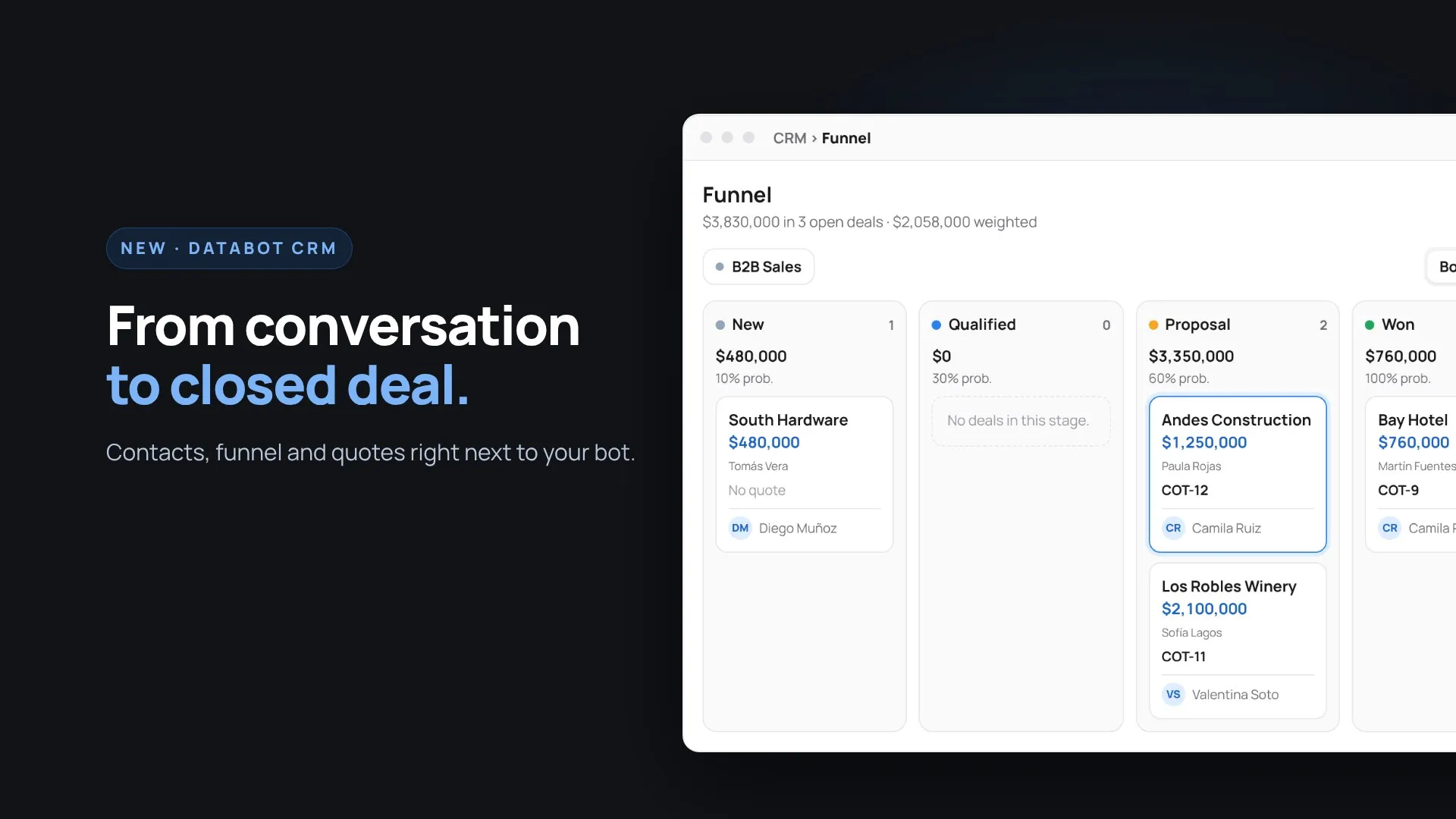
The funnel shows every deal in its stage, with the contact, company, amount, linked quote and owner. You can view it as a board, and drag a deal from one stage to another, or as a table, with filters by stage, owner, quote and tags.
- Multiple funnels: create one per process, for example B2B sales and scheduling, each with its own stages.
- Probability and weighted value: each stage has a close probability, and the funnel adds up your open deals and their weighted value.
- Won and lost: mark a deal as won or lost and review the total for each group.
- Currencies: each deal can be recorded in its own currency, for example Chilean pesos, dollars or euros.
Quotes from the bot and your team
Every quote lives in one list, whether the bot created it in the conversation or your team created it from the CRM. Each one has its number, customer, items, total, payment type, owner and expiry date, and overdue quotes are highlighted so none slip through.
- Statuses: follow each quote from Draft to Sent to Won.
- PDF and conversation: download the document or open the conversation with the customer from the same row.
- Linked to the deal: the quote shows up on the deal’s card in the funnel, so you know what was quoted for each opportunity.
Automations for repetitive work
Alongside the CRM we launched a new automations module, so repetitive tasks run on their own, for example sending a quote’s data to another system through a webhook or a Google Sheets spreadsheet. We’ll cover it in detail in an upcoming article.
Databot CRM FAQ
Does the CRM cost extra?
No. The new CRM is included in every Databot customer’s plan.
Where do I find the CRM in my account?
In the side menu, under Manage, in CRM: that’s where Conversations, Contacts, Funnel, Quotes and Exports are.
Can I have more than one funnel?
Yes. You can create a funnel per process, each with its own stages and probabilities.
Can I import my current contacts?
Yes. You can upload your contact base from an Excel or CSV file.
Does the bot create deals on its own?
Yes. During the conversation, the bot can create the contact, the company, the quote and the deal in the funnel, without your team copying any data.
Do the bot’s quotes show up in the CRM?
Yes. The Quotes list brings together the ones the bot creates in the conversation and the ones your team creates.
Try it with your operation
If you already use Databot, the CRM is available in your account today. If you don’t use Databot yet, book a demo and we’ll show you the whole journey with your own cases: from the first WhatsApp conversation to the closed deal.